
Ask a logistics head where a particular truck is, and they can usually find out in a few minutes: a call to the transporter, a GPS link, a FASTag record.
Ask which of today's trucks need attention, and the answer tends to arrive later, from someone else:
Each of these problems was visible earlier, to anyone looking at that trip at that moment. With hundreds of trips moving across plants, lanes and transporters every day, nobody can look at all of them.
A logistics control tower is built for that gap. It brings tracking data from every trip into one view, checks each trip against its plan, and flags the ones going off course early enough to do something about it: a delay building up, a vehicle that has stopped sending location data, an e-way bill close to expiry, or material sitting at origin longer than it should.
This blog covers what a logistics control tower is, how it works on a real shipment, what it changes for each team, how it differs from shipment tracking and a TMS, and how to tell whether your operation needs one.
A logistics control tower is a system that monitors every inbound and outbound shipment in one place, checks each one against its plan, and alerts your team to the trips going off course. Your team still makes the calls. The control tower tells you which calls are worth making first.
Every logistics control tower system runs on three parts. When one is missing, you end up with a dashboard nobody acts on.
1. Signals
Where each shipment is and what has happened to it so far. In India, these come from several sources at once: fitted GPS, the driver's phone (with consent), FASTag toll reads and e-way bill data. Hired trucks often come from small fleet owners, so no single source covers every trip.
2. A plan to compare against
Location on its own tells you very little. A truck 200 km from your plant is either on time or six hours late, depending on when it was due. The plan comes from your dispatch: the expected arrival, the SLA promised to the customer, the e-way bill's validity and the unloading slot at the other end.
3. Someone who acts
Every exception needs an owner. A late inbound load matters to the plant. An e-way bill about to lapse matters to the dispatch desk. A transporter who runs late on the same lane every week matters to procurement.
Shipment tracking gives you the first part. A control tower is what you get when all three work together.
The two terms are often used interchangeably. Where a line is drawn, a supply chain control tower can reach further upstream, into inventory, supplier commitments and demand planning. A logistics control tower stays focused on freight: the trucks, lanes and transporters that move material between suppliers, plants, warehouses and customers.
For most manufacturers, freight is where day-to-day visibility breaks down first, because it's the part of the supply chain run largely by outside parties. That's why many supply chain control tower platforms start with freight.
The clearest way to see how a logistics control tower works is to follow one shipment through it.
Say an outbound load leaves your plant for a distributor about 600 km away. At that distance, the e-way bill carries three days of validity. Here's what the control tower records at each stage, and what it flags.
Most freight visibility software covers the in-transit row. A control tower also watches the rows before and after it, which is where many of the costlier problems start: a load that sat at the plant for six hours, or a truck that reached on time but waited half a day to unload.
The row most teams miss is the fourth. A truck held for a day at a state border or on a ghat section is running late, but its e-way bill is also running out, because validity is fixed by distance when the bill is generated. Under Rule 138(10) of the CGST Rules, an e-way bill for regular cargo gets one day for every 200 km, and once it expires, it can only be extended within eight hours. Miss that window, and the goods are moving on an expired e-way bill.
Tracking shows you the truck has stopped. A control tower that checks the trip against both its ETA and its e-way bill validity flags the second problem while there's still time to extend. For the full validity and extension rules, see our guide to e-way bill rules and limits.
Every closed trip leaves a set of timestamps: when the truck reported, left, arrived and unloaded. One trip's timestamps tell you very little. Across a few hundred trips, they show which lanes run late, which transporters miss their slots, and how long trucks really wait at your customers' docks. They're also what you check a detention claim against when the invoice arrives.
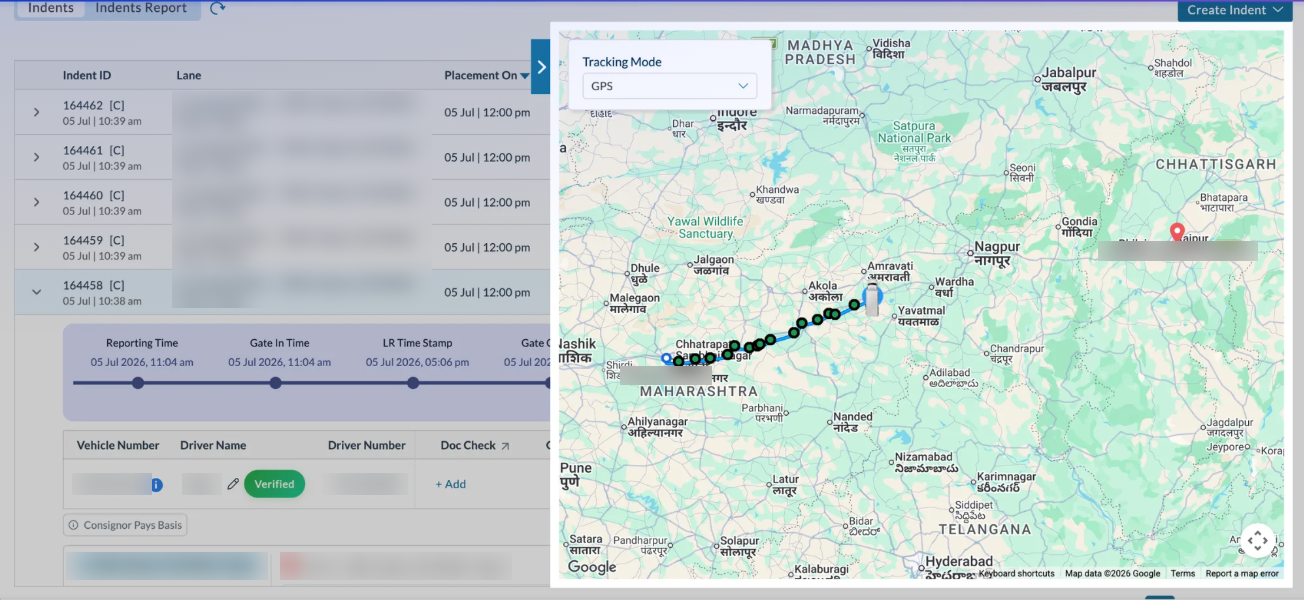
What a trip record looks like: reporting, gate-in and LR timestamps logged against the indent, with the truck’s GPS route tracked on the map.
A logistics control tower gives every team the same live data, but each team looks at a different slice of it. The features are shared. The benefits land differently depending on who is looking.
Here's which features of logistics control tower software each team relies on, and the benefit they get from them.
Features they use: a live view of every active trip, with the ones running late, missing tracking data or close to e-way bill expiry pulled to the top.
The benefit: the desk's workload starts to follow the number of exceptions rather than the number of trucks. Adding 50 trips a day no longer means adding 50 status calls.
Features they use: expected arrival for every inbound load, and an ageing view of how long outbound material has been sitting at origin.
The benefit: production and unloading plans can be built around when trucks are expected. The ageing view also catches something tracking can't: delays that start inside your own plant, when a loaded truck waits hours for paperwork or a gate slot before it ever leaves.
Features they use: on-time performance by lane and transporter, built from every trip instead of from memory at renewal time.
The benefit: when lanes go back to tender through RFQ software, the discussion covers delivery record as well as rate. The cheapest rate on a lane can turn out to be the costliest once the delays, detention and spot replacements it causes are counted.
Features they use: recorded times for when each truck arrived, how long it waited and when it unloaded, along with alerts on e-way bill or e-invoice errors.
The benefit: detention claims get checked against what was recorded, and compliance errors are caught while they can still be corrected.
Features they use: dashboards with the same on-time and delay measures across every plant and region.
The benefit: plants are compared on like terms, so a recurring problem at one location stands out instead of disappearing into a network average.
The benefit: fewer status calls from your team, and disagreements over delays or waiting time get settled on recorded timestamps rather than each side's recollection.
A logistics control tower sits between two tools most manufacturers already use: shipment tracking, which tells you where a truck is, and a transportation management system (TMS), which runs the freight itself. Here's how the three differ.
Tracking is one of the control tower's inputs. The difference is who goes looking. With tracking, someone has to know which truck to check. With a control tower, the trucks that need checking are brought to your team.
At 20 trips a day, an experienced dispatcher can keep the whole picture in their head. At 300 trips across several plants, nobody can, and the difference decides whether a delay is caught by your team or reported by your customer.
A TMS runs freight: sourcing transporters, raising indents, dispatching vehicles, confirming delivery and checking invoices. A control tower watches freight while it moves.
The two depend on each other more than they first appear to:
That's why many platforms now offer both together. When they run as separate systems, someone ends up copying trip details from one into the other, and over time the plan and the tracking drift apart.
There's no truck count or revenue figure that decides when you need a logistics control tower. The signal is how your team finds out about problems today.
Tick the ones that sound like your operation:
If three or more apply, the gap is in how trip data is captured. Adding people to the dispatch desk won't close it.
1. Start with one plant or a set of lanes
Pick where delays cost you the most: the plant whose inbound loads feed a production line, or the lanes with the most customer complaints. A smaller start shows results faster and surfaces data problems early.
2. Agree the plan before switching anything on
A control tower checks trips against expected transit times, SLAs and unloading slots. If those aren't agreed lane by lane, either every trip looks late or none does. This is where many rollouts stall, and it's a planning task more than a software one.
3. Sort out tracking coverage by transporter
List which transporters have fitted GPS. For the rest, plan for SIM-based tracking, which needs the driver's consent, and FASTag toll reads as a fallback. Talk to transporters early, since they're the ones who have to bring drivers on board.
4. Give every alert an owner
Decide who receives which alert, and through which channel. An alert that goes to everyone gets acted on by no one, and too many low-priority alerts train people to ignore the important ones.
5. Connect it to how trips are created
Trips should come into the control tower from your ERP, e-way bills or freight execution software, so nobody keys in the same shipment twice.
6. Review after the first month
Compare how delays were discovered before and after, how much detention was disputed, and which lanes and transporters show up most often in the exceptions. Then extend to the next plant.
Whichever logistics control tower solution you choose, steps 2 and 4 decide whether it gets used. The technology rarely fails on its own. The plan and the ownership around it usually do.
FreightFox is a TMS and control tower on one platform, built for Indian manufacturers and part of a wider freight management software suite. That matters for the reason covered in the comparison above: the plan your trips are checked against (the indent, the contracted lane, the SLA) and the tracking that checks them sit in the same system.
Here's how FreightFox's logistics control tower platform handles the gaps this blog has covered.
When a trip is flagged, the transporter's contact details are on the same screen, so your team can follow up straight away instead of searching for a number.
Atul Limited achieved real-time shipment visibility across 1,000+ origin-destination lanes with FreightFox.
Most logistics teams can already find a truck when they need to. The cost sits in the trucks nobody was looking at: the inbound load that held up a production line, the e-way bill that lapsed on a delayed trip, the detention charge nobody could check.
That's how a logistics control tower improves supply chain visibility. Most of the tracking data already exists. The control tower checks every trip against its plan and brings the exceptions to the people who own them, while there's still time to act. If you ticked three or more boxes in the checklist above, your operation has already outgrown checking trips one call at a time.
Book a demo to see how FreightFox flags the trips that need your team's attention, across your plants and lanes.

See how leading enterprises are optimizing freight costs, performance, and emissions with FreightFox — all in one platform.
FreightFox is a full-stack TMS and Control Tower platform that helps enterprises streamline freight procurement, execution, visibility, settlement, and sustainability—from Procure-to-Pay